
















Find Tools (special tools, key caps tools, liquid metal, thermal gel, drivers, etc.) by Brand
Why Choose EMPR for Your Tools (special tools, key caps tools, liquid metal, thermal gel, drivers, etc.)?
EMPR Australia offers 100% certified genuine replacement Tools (special tools, key caps tools, liquid metal, thermal gel, drivers, etc.) specifically designed for your device. With EMPR, not only do you get original branded Tools (special tools, key caps tools, liquid metal, thermal gel, drivers, etc.), but you also get outstanding customer service and support. We're here to help you every step of the way.

Authorised Partner in Australia
As the only authorised parts partner, we procure Tools (special tools, key caps tools, liquid metal, thermal gel, drivers, etc.) directly from manufacturers under our long-term distribution agreements.

Original & Compatibility Guarantee
Experience no hassle with compatibility and quality when choosing our original Tools (special tools, key caps tools, liquid metal, thermal gel, drivers, etc.), and no risk of voiding your hardware warranty.

Same-Day Australia-Wide Shipping or 1-Hour Click & Collect (if in Stock)
Place your order before 3 pm and, if the Tools (special tools, key caps tools, liquid metal, thermal gel, drivers, etc.) is in stock, we will ship it out to you on the same day or click and collect in 1-hour.

12 Month Warranty & 30 Day Money Back Guarantee
Our Tools (special tools, key caps tools, liquid metal, thermal gel, drivers, etc.) come with a 12-month replacement warranty for failures and a 30-day money-back guarantee for customer satisfaction.

High-Quality Substitute Tools (special tools, key caps tools, liquid metal, thermal gel, drivers, etc.)
If the original Tools (special tools, key caps tools, liquid metal, thermal gel, drivers, etc.) is End of Life (EOL), we also offer compatible Tools (special tools, key caps tools, liquid metal, thermal gel, drivers, etc.) at an affordable price without compromising performance.
These batteries undergo rigorous quality control measures, striking the perfect balance between cost-effectiveness and reliability.

Expert Assistance & Our Tools (special tools, key caps tools, liquid metal, thermal gel, drivers, etc.) Guide
Need help identifying the correct Tools (special tools, key caps tools, liquid metal, thermal gel, drivers, etc.)? Chat with us or check out our comprehensive Tools (special tools, key caps tools, liquid metal, thermal gel, drivers, etc.) guide or Contact us on 1300 134 324.
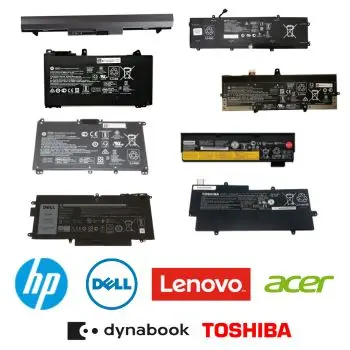
Hassle-Free 30 days Returns and 12-month Warranty
If your Tools (special tools, key caps tools, liquid metal, thermal gel, drivers, etc.) isn't the right fit, return it within 30 days for a full refund with our 30-Day Money Back Guarantee. We also offer a 12-month warranty on our Genuine Tools (special tools, key caps tools, liquid metal, thermal gel, drivers, etc.). If you encounter any quality issues, we provide a free replacement.
Trust EMPR for All Your Laptop Battery Requirements
Choose EMPR for your Laptop Tools (special tools, key caps tools, liquid metal, thermal gel, drivers, etc.) Tools (special tools, key caps tools, liquid metal, thermal gel, drivers, etc.) and benefit from our quick shipping, 12-month warranty, and excellent substitute options if needed. Our knowledgeable and friendly customer service team is here to ensure your satisfaction and assist with any Tools (special tools, key caps tools, liquid metal, thermal gel, drivers, etc.) identification needs. Trust EMPR for all your laptop Tools (special tools, key caps tools, liquid metal, thermal gel, drivers, etc.) requirements.
